Practical Guides · Business Central & LS Retail

Fix it, configure it, reconcile it.

Practical Business Central and LS Central guides based on real retail IT experience, technical research, and documented solutions. Configuration, POS troubleshooting, integrations, and operational problems, explained without the marketing fluff.

631 guides · 11 topics · 8 working calculators, written for the people who keep stores running.

Start With the Problem

Most visits here start with something on fire

Four situations come up again and again. Each one has a guide written for the moment, not for a product tour.

The POS went offline mid-shift Documented

When the connection drops, where transactions go, and how to verify nothing was lost when you are back online.

Read the guide →

The statement will not post Troubleshooting guidance

Posting groups, blocked items, and statement errors, a troubleshooting checklist in the order you should check them.

Work the checklist →

It worked in the demo Documented

The configuration errors behind most setup disasters, and how to fix each one: 5 Business Central setup mistakes that break LS Retail.

Check your setup →

The tills do not match the books Documented

A step-by-step close routine: POS batch, statement posting, and hunting down the tender differences.

Reconcile the day →

Featured Guide

How LS Central and Business Central actually talk to each other

Replication, Data Director, statements, and where the data really lives, the mental model that makes everything else click.

That picture stops being complete as soon as a second database enters the setup, and LS Central supports several setups that have one. An offline POS carries a database of its own. A distributed estate replicates between a head office database and store databases. Which setup you are running decides whether replication exists at all, what the Data Director does in it, and how a sale reaches the general ledger.

Read the guide

“In the simplest setup there are therefore not two systems exchanging data. There is one Business Central database, and the LS Central data for items, POS transactions and statements sits in it alongside the financial data.”

From the guide, on the single-database setup

Inside the Two Systems

Where a sale actually travels

Most LS Central confusion comes from not knowing which database holds what. This is the standard shape of it; the featured guide above walks through every hop.

POS terminal the sale happens LS Central an extension, not a bolt-on Business Central one shared database General ledger at end of day Offline POS database keeps selling, syncs later Data Director replication POS terminal the sale happens LS Central an extension, not a bolt-on Business Central one shared database General ledger at end of day When a till goes offline Offline POS database keeps selling, syncs via Data Director
A simplified map of the standard setup, drawn as a diagram. Which of these databases you actually have depends on your estate, and the guides on this site name the setup before they give instructions for it.
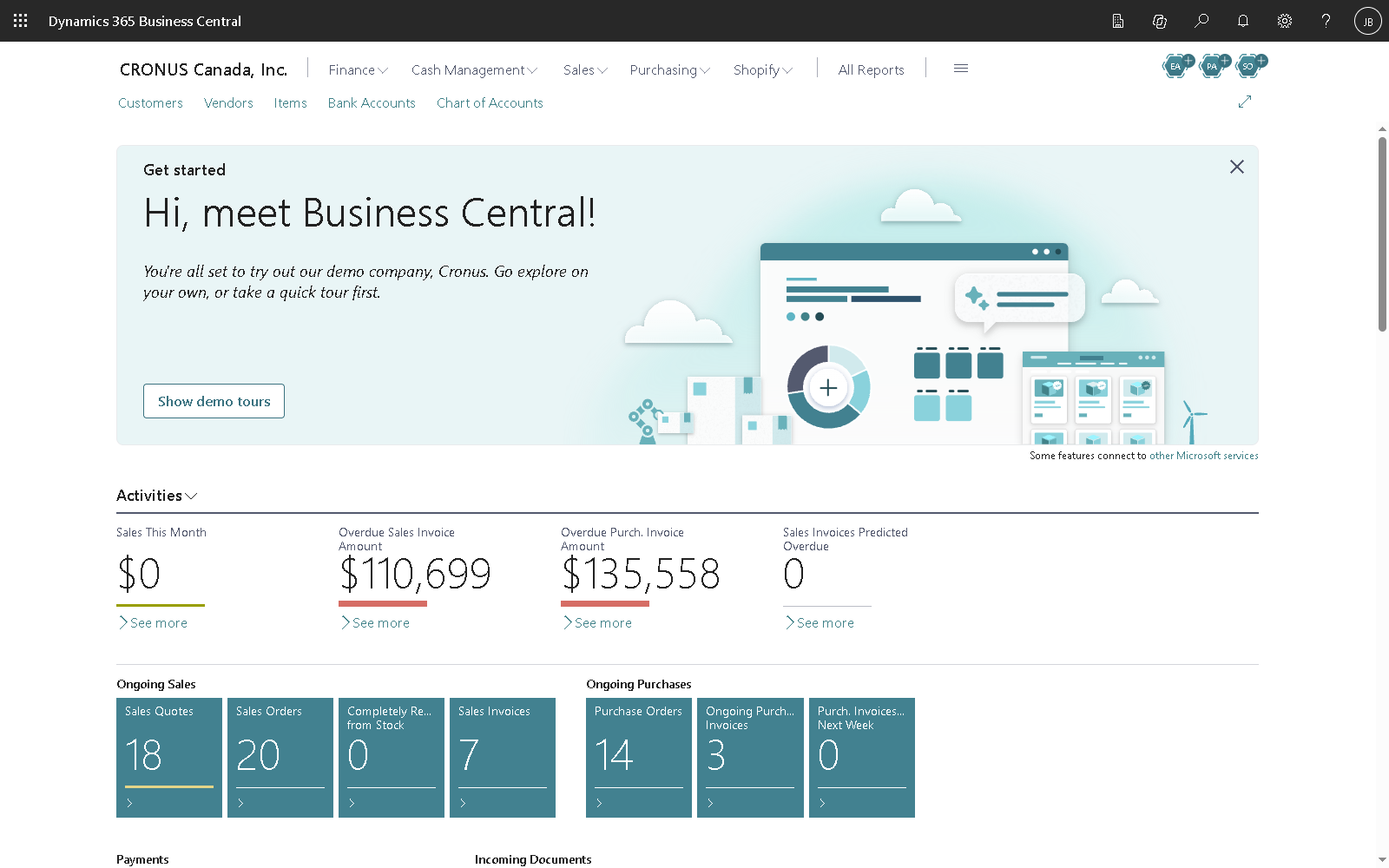
Business Central role centre for the CRONUS Canada demo company, with activity cues for sales this month and overdue invoices
Business Central role centre, demo company in the trial tenant the guides are tested in.
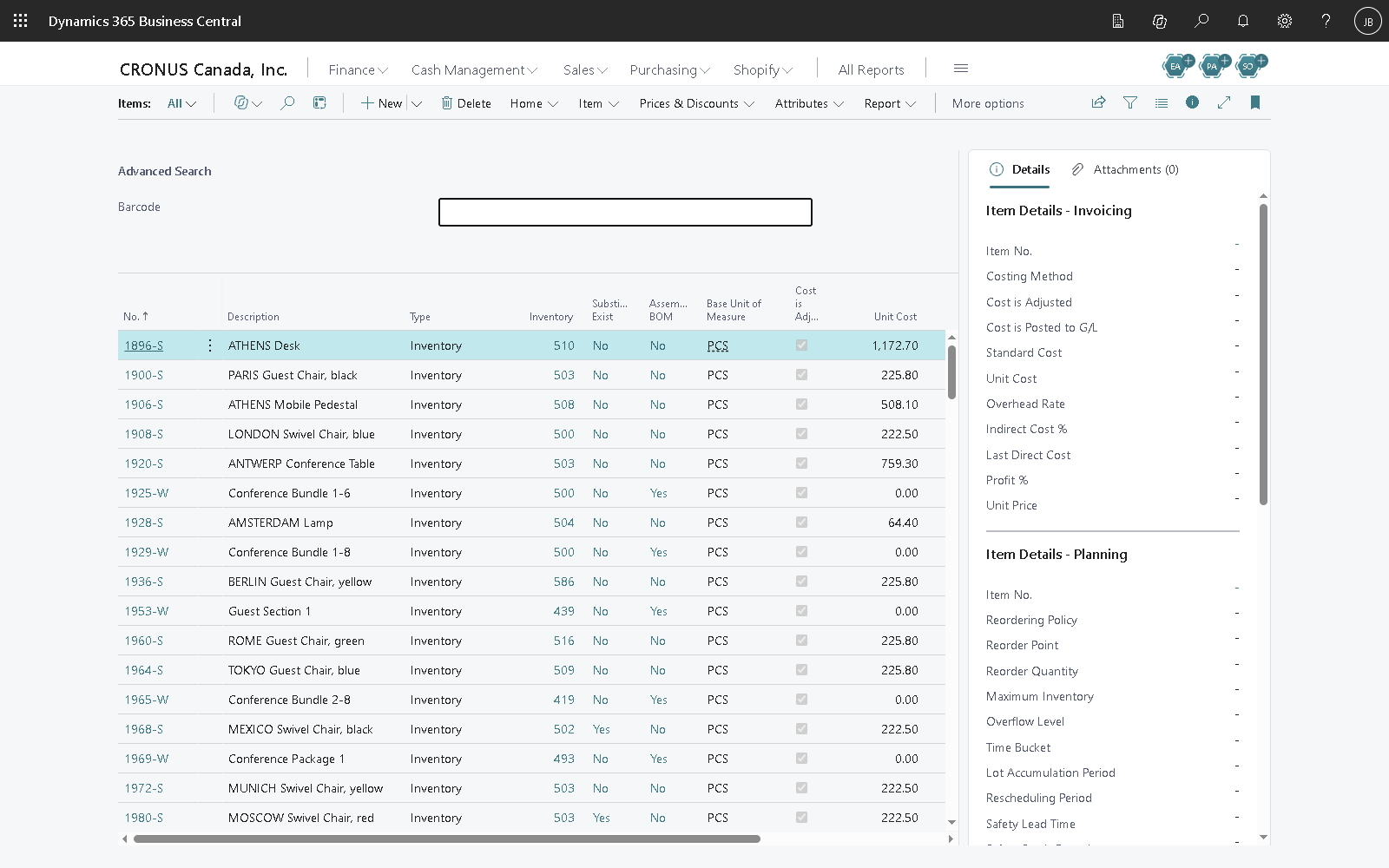
Business Central item list showing demo company items with inventory, type, and unit cost columns
The item list in the same demo company. Items are the shared ground between the till and the ledger.
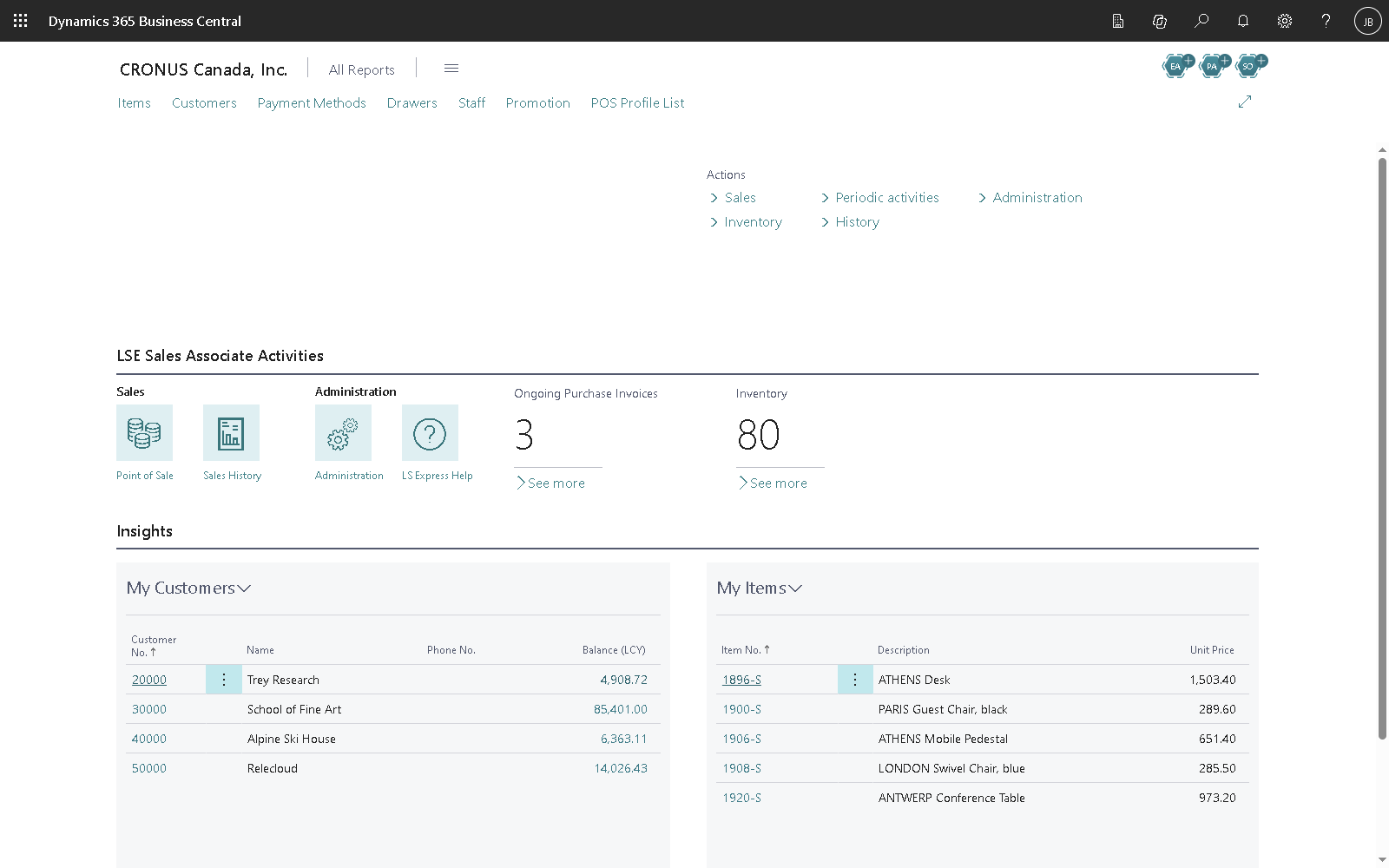
LS Express role centre inside Business Central, with Point of Sale, Sales History, and Administration tiles
The LS Express role centre inside Business Central. LS Express is the trial point of sale, not LS Central; it runs in the same Business Central surface the LS Central guides work from.
Real screens, captured in November 2026 from the Business Central trial tenant used to test these guides. The data is the CRONUS demo company, not a real store.

At the till

The POS records the sale against LS Central tables. Nothing has touched the ledger yet, which is why a sale can be real at the till and invisible in finance.

In the statement

End of day collects the day’s transactions into a statement. Counting, calculating, and posting the statement is the moment retail activity becomes accounting.

In the books

Once the statement posts, the general ledger holds the result. When the numbers look wrong, the guides here work backwards along this path to find the hop that failed.

Browse the Field Guide

Eleven topics, from the till to the back office

The two biggest shelves first. Counts are the guides you will find on each topic page today.

Store Operations

Day-to-day LS Central POS and store operations: gift cards, returns, offline mode, lookups, till procedures, open and close routines, X and Z reports, cash pickups, till discrepancies, and daily statement reconciliation.

78 guides

Administration & Upgrades

Business Central and LS Central administration and upgrades: backups, archiving, job queue failures, users and licences, telemetry, version management, release notes, hotfix guides, and upgrade readiness.

65 guides

Specialist shelves: Item Setup & Master Data (12 guides), POS Hardware (11), and Tenders & Currency (10). Or skip the shelves and see all 631 guides, A to Z.

New: The Tools Shelf

Calculators that do the math

Eight working calculators, added November 2026. Bring your own numbers; each one shows its working and states its assumptions. No signup, nothing uploaded.

BC and LS Per-Store Licence Cost Estimator

What the Business Central plus LS stack costs per month and per year at list price, and whether your tills are over-licensed. The question every renewal turns into a sales call is answered here in the open.

See all eight tools on the tools shelf →

From the Guidebook

Guides worth your coffee break

A working shelf, not a greatest hits list: money, stock, and the month-end, chosen because each one settles a question that comes up in real stores.

Browse all 631 guides, A to Z →

How These Guides Are Checked

Honest labels, guide by guide

Where a guide carries a verification label, the label says how the information was checked. It is the same system the About page explains, applied guide by guide rather than claimed for the whole site at once.

Field-tested Documented Troubleshooting guidance

Read how this site works, and who writes it →