 BC LS Retail Tips
Click and Collect Data Flow: From Web Order to POS Pickup in LS Central
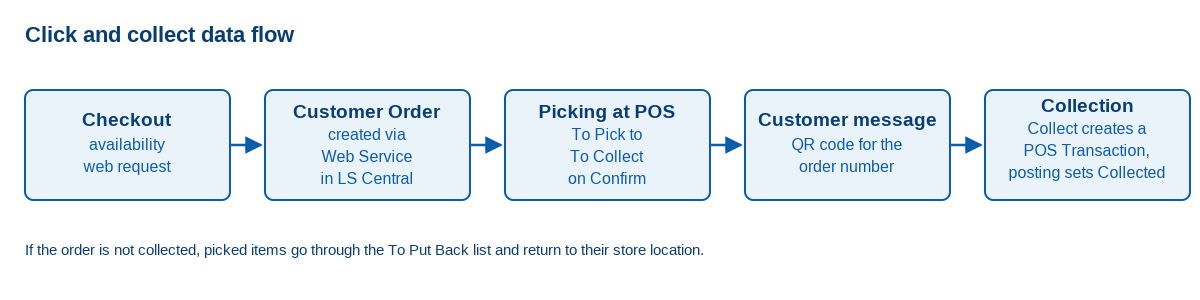
A customer has paid online and is driving to the store. What has to happen, in which system, before staff can hand over the bag?
Five hand-offs. A web-request checks availability at order time. A Customer Order is created in LS Central via Web Service from the eCommerce website. Staff pick the order at the POS, moving it from To Pick to To Collect. The customer receives a message carrying a QR code. Collection at the POS creates the transaction, and posting finishes the order.
Each hand-off leaves a record or a status. That is what makes a stuck order findable: the flow can be walked, record by record, until the step that did not happen.
One order, seven hand-offs: the flow at a glance
| Step | What moves | Where it lands |
|---|---|---|
| Checkout | Availability web-request for the collection store | Checked at order time, before the order exists |
| Order creation | Customer Order created via Web Service | LS Central, from the eCommerce website |
| Picking | Status To Pick, then To Collect on Confirm | Customer Order, worked from the POS |
| Notification | Message with availability, collection time frame and QR code | Customer, for scanning at the POS |
| Collection | Collect creates a POS Transaction | POS; posting sets lines to Collected and posts the order |
| Not collected | Picked items go through the To Put Back list | Back to their store location |
One status rule governs the middle of the table: a Customer Order has one status at a time. To Pick, To Collect, or To Put Back. Not two, not a blend. Any report or list that appears to show an order in two states is showing two different moments, and the later one is the truth to act on.
Hand-off 1: checkout and the availability web-request
The flow starts before the order does. At order time, a web-request calculates item availability in the store the customer selected for collection.
That check is the promise the rest of the flow has to keep. It is calculated for one store, the selected collection store, not for the chain, and not for stock in transit. When a customer arrives for an item the store does not have, the first check is whether the availability request was made for the store they selected, and what it returned at order time. A picking problem and an availability problem look identical at the collection desk and are fixed in different systems.
Hand-off 2: the Customer Order lands in LS Central
Click and Collect Customer Orders are created in LS Central via Web Service from the eCommerce website. The website does not hold the working order; LS Central does. Picking, slips, status and collection all act on that record.
So the first stuck-order check is existence. If no Customer Order exists in LS Central for a paid web order, nothing downstream is broken, nothing downstream has started. The fault sits at creation: the web-service call from the website, or the order’s journey to it. Chasing the POS for an order that was never created wastes the one resource the customer is spending, which is waiting time.
Hand-off 3: picking at the POS. To Pick becomes To Collect
Picking is POS work, with named commands. Staff open the order with the CUSTOMER_ORDER_LIST POS command. From the Customer Order List, PICK opens the picking panel for the selected order, and PICK_ALL updates all lines of a selected order from To Pick to To Collect in the POS panel.
One precision matters here. PICK_ALL changes the lines in the POS panel; the actual status update on the Customer Order happens when the Confirm button is pushed on the POS panel. An order picked on screen but never confirmed is still To Pick on the record, which is exactly what the next member of staff, and any status report, will see.
- Open the order list with the CUSTOMER_ORDER_LIST command and select the order.
- Print the Picking slip and collect the items it lists.
- Use PICK for line-by-line picking, or PICK_ALL when every line of the order is being picked, then push Confirm so the Customer Order itself moves to To Collect.
- After collecting, print the Collect slip and attach it to the bag or box.
What success looks like at this hand-off: the Customer Order status reads To Collect, on the order, not only in the panel, and the bag carries a Collect slip that matches the order.
Hand-off 4: the customer message and the QR code
When the order is picked, the customer receives a message with the availability, the collection time frame, and a QR code for the order number, scannable at the POS.
The QR code is not decoration. It carries the order number, and scanning it at the POS is the fast path from a person at the desk to the exact order record, no name spelling, no order-number transcription. A customer without the message can still be served from the order itself; the code removes the search, it does not gate the collection.
Troubleshooting honesty applies to this leg. The retrieved LS Retail documentation describes the message being sent on picking, but does not document what to check when the message never arrives. Treat a missing message as a picking-status question first: was the order actually picked and confirmed, which is the event the message follows? If the order sits in To Collect and no message arrived, the gap is in the notification leg, and the documented flow offers no named check for it, record the order number and the pick time, and escalate with those two facts rather than re-picking the order.
Hand-off 5: collection, the order becomes a POS transaction
Collection is where the order stops being a promise and becomes a sale. On Collect, a POS Transaction is created. When the transaction is posted, the collected lines change to Collected, and the order is posted once all items are processed.
Read that sequence in order, because each stage can stall separately. No transaction means Collect was never completed at the POS. A transaction that has not posted means the lines are not yet Collected. Lines not yet Collected mean the order is not posted, because the order posts only once all items are processed.
The uncollected branch closes the loop. Items picked but not collected go through the To Put Back list, so they return to their store location. An order abandoned at To Collect is not just a customer-service loose end; its stock is sitting in a bag instead of on a shelf, and the To Put Back step is what puts that stock back into the store’s available picture.
Stuck-order checks: where orders stall and how to unstick them
- Paid online, no order in LS Central. The creation hand-off failed. Check the web-service creation from the eCommerce website before touching the POS, there is no record for the POS to find.
- Order exists, still To Pick, staff say it was picked. The panel was worked but Confirm was not pushed; the status update on the Customer Order happens on Confirm. Confirm the picking, then verify the status on the order itself.
- Order To Collect, customer has no message. Verify the order was picked and confirmed, then record the order number and pick time and escalate the notification leg, the retrieved documentation names no resend step, so do not invent one at the desk.
- Customer at the desk, bag ready, nothing to collect against. Work from the Customer Order, not the message: open it via CUSTOMER_ORDER_LIST. The QR code speeds the search; its absence does not block collection.
- Collected at the desk, order not posted. Check the POS Transaction created on Collect: unposted transaction, lines not Collected, order not posted, in that order. The order posts once all items are processed.
- Order never collected. Move the picked items through the To Put Back list so they return to their store location, and the stock is available again for the next availability check.
What success looks like, end to end: the Customer Order exists, its status moved To Pick to To Collect on a confirmed pick, the collection created a POS Transaction, the transaction posted, the collected lines read Collected, and the order is posted. Six facts, each checkable on a record. An order that meets all six is finished; an order that misses one is stuck at exactly that hand-off, and the checks above are ordered to find it.
, Dex Carter, Tech Writer
Keep readingNext: How customer and member data moves between LS Central and Business Central →