 BC LS Retail Tips
Job Queue as Integration Engine: Retries, Restarts, and Alerting on Failed Runs
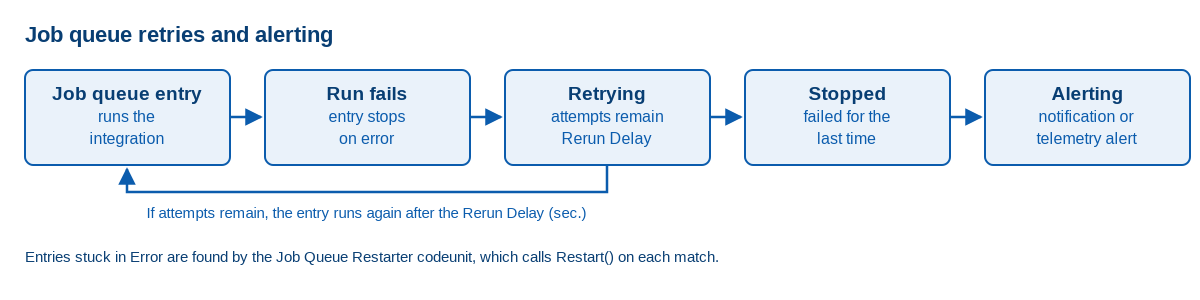
“Set Maximum No. of Attempts to five and the integration looks after itself.” That sentence is the myth, and it survives because the field names sound like a guarantee. The documented behaviour is narrower. A job queue entry stops running on error and must be manually restarted. Maximum No. of Attempts and Rerun Delay (sec.) can keep an entry retrying until an external service becomes available again — that is the scope Microsoft gives the feature: riding out an unavailable dependency, not repairing a broken job. Treating a retry counter as an integration policy leaves three holes: entries that land in Error and stay there, failures nobody hears about, and retries applied to jobs that should never run twice unchanged.
The myth: Maximum Attempts means it retries
Start with the spec check. Microsoft’s job queue documentation pairs two statements that are often read as one. First, the default: an entry that errors stops, and a person restarts it. Second, the exception: with Maximum No. of Attempts and Rerun Delay (sec.) set, the entry can keep retrying while it waits for an external service to come back. The exception is conditional on the failure being the kind that resolves itself — a service that was down and returns. A configuration error, bad data, or a code fault does not resolve itself between attempts. It fails again, on schedule, until the attempts run out.
Telemetry names the two endings precisely. One event reports a job queue entry that failed and might be retried. A different event reports an entry that failed for the last time and is set to stopped. Those are different operational states, and a monitoring habit that cannot tell them apart will miss the moment a retrying integration becomes a stopped one.
What actually happens on failure, status by status
Three endings matter for an integration entry:
- Retrying. The entry failed, attempts remain, and the Rerun Delay counts down to the next run. Nothing needs a human yet — provided someone would notice if the state changed.
- Stopped after the last attempt. The entry used its attempts and stopped. From here, recovery is manual: restart the entry by setting it On Hold and then Ready, or restart it directly.
- Error, and staying there. This is the case the documentation does not cover and the forums do. A reported EDI sales-order process deadlocked, terminated in Error status, and did not retry despite Maximum No. of Attempts being set, until the entry was manually reset to Ready. One forum report is not proof of a common defect. It is proof that “attempts are set, therefore retries happen” is an assumption worth verifying per integration, not a property worth trusting blindly.
When a restart does not fix an entry, stop restarting it. The AL stack trace in the Job Queue Log identifies the code owner — the party who can fix the fault rather than re-run it. That distinction is the line between operating an integration and merely poking it. The wider setup context sits in the job queue setup guide, and the stuck-jobs guide covers entries that sit Ready and never run; neither replaces the failure policy below.
Set retries like an integrator: attempts, delay, and a second-run check
Set the two fields per integration, not once for the whole queue. Work through each entry with three questions:
- What failure is this retry for? Name the external dependency that might be briefly unavailable. If no such dependency exists, extra attempts buy repeated identical failures.
- How long can the outage plausibly last? Attempts multiplied by Rerun Delay is the total window the entry will keep trying. Size the window to the dependency, in seconds and attempts the team can state out loud.
- What does a second run do? Before any entry earns retries, answer what happens if the first run partly succeeded and the job runs again. If the honest answer is “unclear,” the entry gets a low attempt count and a human restart until that changes.
What success looks like: every integration entry has its attempts and delay recorded next to the dependency those numbers were sized for, and no entry carries a high attempt count by inheritance from a queue-wide default nobody chose.
Alerting routes compared: in-product, Power Automate, telemetry, extensions
A retry policy without a notification route is a silent failure with extra steps. Microsoft documents three routes; they reach different people in different ways.
| Route | How it is set up | Who hears about it |
|---|---|---|
| In-product notification | Set Up Job Queue Notifications assisted setup | The user who started the job, administrators, or both — inside the product |
| Power Automate flow | A flow subscribed to the Job queue task failed business event, arranged through the same assisted setup | Whoever the flow is built to reach, outside the product |
| Application Insights telemetry alert | Administrator alerting on job queue telemetry | Administrators, by text, email, or Teams |
Two settings decide whether any route earns its keep: who is notified — the starter, administrators, or both — and when, immediately or only after a failure threshold is crossed. Immediate notification on a retrying entry creates noise; notification only at the end state creates silence during the retry window. The threshold option exists for that tension, so set it deliberately. Telemetry adds the second layer: its events distinguish “might be retried” from “failed for the last time,” and task scheduler telemetry shows what happened in the background sessions behind scheduled tasks, which is where a failure timeline gets reconstructed.
A fourth route appears in research for this topic: third-party notifier extensions on AppSource that advertise automatic notification and automatic restart of failed entries. No retrieved vendor-neutral source verifies those claims, so treat an extension as a purchase to evaluate against the three documented routes — not as a documented capability. If the built-in routes reach a human reliably, the extension has to justify itself against them.
The restarter pattern for entries that die in Error
For the Error-and-stuck case, the community pattern is a watchdog. One documented implementation works like this:
- Build a small Job Queue Restarter codeunit. It filters Job Queue Entries to Status = Error and to one Object ID to Run, passed in through the Parameter String, so each restarter watches a named job rather than the whole queue.
- Call Restart() on each match. That is the entire job: find the stuck entries for that object, restart them.
- Keep the restarter isolated in its own app. The reason is structural: a restarter tied to the failing job shares the failure. Isolated, it keeps running when the watched job does not.
- Schedule it as its own job queue entry. The forum workaround for the deadlock case was the same shape: a separate job, running every few minutes, resetting the failed entry’s status to Ready.
A restarter is a safety net, not an excuse to stop reading logs. An entry that needs restarting every day has a fault, and the Job Queue Log stack trace still names its owner. Count restarts per entry; a rising count is a defect report, whether or not a human filed it.
An integration job-queue policy you can copy
Per integration entry, record five lines and review them when the integration changes:
- Dependency the retries exist for, with attempts and Rerun Delay sized to it.
- The second-run answer: what a repeat run does, stated in one sentence.
- Notification route and audience: starter, administrators, or both — immediate, or after a named failure threshold.
- Telemetry alert for the stopped end state, so the last failure is louder than the retries before it.
- Restarter coverage, by Object ID, for any entry whose failure mode is known to strand it in Error — plus a restart count reviewed on a schedule.
None of that requires new tooling. It requires refusing to let two fields — Maximum No. of Attempts and Rerun Delay — stand in for decisions they were never designed to make.
, Dex Carter, Tech Writer
Keep readingNext: How LS Central and Business Central actually talk to each other →