 BC LS Retail Tips
Integrating Card Payments Beyond LS Pay: What Changes in the Data Model
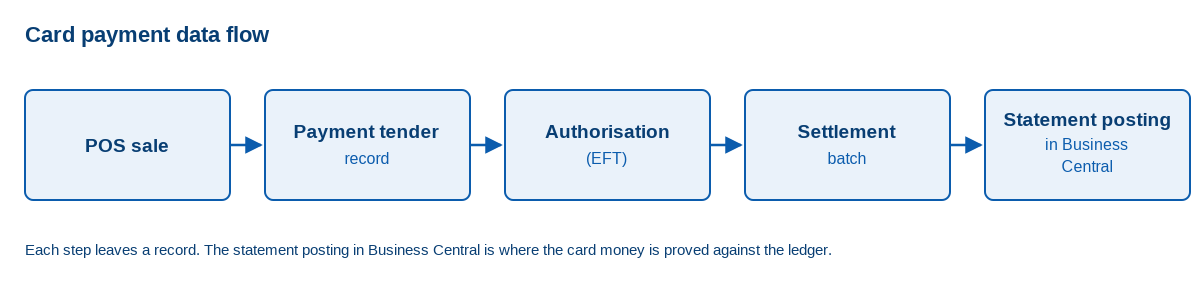
A customer watches the terminal approve a card. The cardholder receipt prints. The POS screen, though, still shows an unfinished sale and no payment line the cashier can trust. Two records now disagree about the same money: the terminal holds a completed transaction, and the POS holds a gap.
That split is the starting point for any card integration that goes beyond LS Pay. The question is not which button starts a payment. The question is where authorisation state lives at each step, which record proves it, and how an unfinished record gets reconciled when the two sides drift apart. An integration that cannot answer those three questions has a happy path and nothing else.
Start at the failure: a card was charged, the POS shows nothing
Treat that mismatch as a data problem before treating it as a hardware problem. Something was charged, so an authorisation exists somewhere. Something is missing at the POS, so a record that should carry that result back did not finish, did not match, or was never created.
Do not re-run the card to tidy the screen.
A second attempt answers a different question, whether the terminal can take another payment, and it leaves the first authorisation unreconciled. The documented recovery route for this exact split works in the opposite direction: it starts from the unfinished POS record and asks the terminal what its last transaction was. Recovery first appears later in this piece as a numbered procedure, because the order matters: record, terminal, match, log.
The records an authorisation touches, in order
Start with the documented entry point. In the LS Pay EFT Extension, the main entry point to payments is the LSCEFT Payment Entry Point codeunit. An external integration design should name its equivalent plainly: the one place a POS payment request enters the payment layer. If that entry point is vague, every later record becomes hard to trace, because nobody can say where the request changed hands.
Next comes the device record. The extension requires an EFT device in the EFT Device List in Business Central, and at least one EFT device in the LS Pay Service. Device data is not decoration around the integration. It is the record that says which terminal a transaction runs on, and a missing or wrong device record stops the chain before an authorisation exists at all.
Then comes the card entry: the POS-side record of the card transaction. Its importance shows up at failure time. The documented recovery command checks a failed Card Entry, described in the POS command help as a failed or unfinished POS entry, so the card entry is the record an operator returns to when the sale and the terminal disagree.
| Record or surface | What it carries | Check it against |
|---|---|---|
| LSCEFT Payment Entry Point codeunit | The main entry point to payments in the EFT Extension | Your integration's named entry point for a payment request |
| EFT Device List in Business Central | The EFT device record the extension requires | The device also present in the LS Pay Service |
| Card Entry | The failed or unfinished POS entry at recovery time | The last transaction on the EFT terminal |
| Mock device | Pre-programmed responses for testing | Trigger amounts for Declined, Cancelled and Error results |
| Pre-authorisation extra info | Authorisation data that exists before a payment line does | Where that data persists on the transaction, see the gap below |
One record family is deliberately missing from a tidy version of that table: a complete mapping of card-entry, payment-entry and tender records for an external integration. Checked on 2026-10-26, no retrieved source maps those records together in one place for a non-LS-Pay terminal. So the tender side, how a terminal result becomes a POS payment under a card tender, is a design item the integrator has to specify and test in their own build. Presenting it as settled documented behaviour would overstate the sources.
Device selection: the design decision the extension leaves to you
Here the documentation is unusually direct. Integrators need to design and implement their own method for selecting which EFT Device a transaction runs on. Two routes are suggested: a settings page that saves the device to a user, an instance or a POS profile, or a selection dialog at the start of a transaction.
Those two routes create different data.
A settings page tied to a profile makes the choice durable setup data. The selection is decided before a sale starts, it can be reviewed away from a live transaction, and a wrong assignment shows up as a setup defect. A dialog at transaction start makes the choice per-transaction data instead. The operator decides in the moment, which can help where terminals move, but each transaction then depends on a human picking correctly under queue pressure.
Pick one route as the design, name where its data is stored, and decide what happens when no device is selected. A selection method with no stated answer for the empty case will find that case at a till, during trade.
Spec check before any terminal is wired
The extension's prerequisites are short and checkable. Verify each one as a fact, not as an assumption:
- The LS Pay Service is running.
- At least one EFT device exists in the LS Pay Service.
- Business Central is version 25 or higher.
- An EFT device exists in the EFT Device List in Business Central.
Testing has a documented shortcut. A Mock device returns pre-programmed responses, including trigger amounts for three results an integration must handle cleanly: 103.01 for Declined, 103.02 for Cancelled, and 101.01 to 101.10 for Error transaction statuses. Run those amounts on purpose. A payment flow that has only ever seen approvals has not yet met the records that cause the trouble described at the start of this piece.
Recovery by design: card entries and EFT_RECOVER
The POS command help documents EFT_RECOVER as a check on whether the last failed Card Entry can be recovered. It checks the last transaction on the EFT terminal and, if that transaction matches the failed or unfinished POS entry, it recovers the entry and logs it in the system.
Two companion commands widen the evidence. EFT_LAST_TRANS gets the last EFT transaction from the PED. EFT_GET_XREPORT and EFT_GET_YREPORT invoke the terminal's own report processes. None of these commands invents a result. Each one asks the terminal for its side of the record.
- Stop at the unfinished entry. Leave the sale as it is and identify the failed or unfinished Card Entry. Do not take the card again.
- Ask the terminal for its last transaction. Use EFT_LAST_TRANS to get the last EFT transaction from the PED, so the terminal's record can be compared with the POS record.
- Run EFT_RECOVER. The command checks whether that last terminal transaction matches the failed or unfinished POS entry.
- Accept only a matched recovery. If the transactions match, EFT_RECOVER recovers the entry and logs it in the system. If they do not match, stop, the terminal's last transaction belongs to something else, and forcing a match would attach the wrong authorisation to this sale.
- Use the terminal reports as supporting evidence. Where a wider check is needed, EFT_GET_XREPORT and EFT_GET_YREPORT invoke the terminal's report processes rather than relying on memory of the sale.
What success looks like: the unfinished Card Entry is recovered and logged, the terminal transaction it matched is the one for this sale, and no second card attempt was needed to produce that result. If the entry cannot be matched, success is a clean stop with both records preserved, not a forced completion.
Pre-authorisations: data that exists before a payment line does
A pre-authorisation breaks the tidy order above. The authorisation exists, but it is not yet a finished payment.
The clearest retrieved description of that state comes from LS One developer help, a different product's documentation, and the distinction matters. There, pre-authorizations are not tied to a payment line until they are finalized, so an EFTTransactionExtraInfo object holding PreAuthInfo lines is serialized and deserialized to persist on the transaction.
Read that as a design pattern and a warning, not as LS Central behaviour. The warning: authorisation data that precedes a payment line still needs a durable home on the transaction, or finalisation later has nothing reliable to attach to. The gap: retrieved LS Central sources do not cover pre-authorisation data handling for external terminals. An LS Central integration therefore has to state, in its own design, where pre-authorisation info persists between authorisation and finalisation, and test the interval between those two moments, not just the endpoints.
Data-model checklist for a non-LS-Pay terminal integration
- Entry point named. One codeunit-level entry point for payment requests, comparable to the LSCEFT Payment Entry Point in the extension.
- Prerequisites verified. Service running, a device in the service, a device in the EFT Device List, and Business Central 25 or higher.
- Device selection designed. Settings page or transaction dialog, chosen, with its stored data and its no-device behaviour stated.
- Failure results rehearsed. Declined at 103.01, Cancelled at 103.02 and Error results across 101.01 to 101.10, all via the Mock device.
- Recovery path documented. Card Entry identified, EFT_LAST_TRANS compared, EFT_RECOVER run, and a match required before recovery is accepted.
- Tender mapping specified by the integrator. How a terminal result becomes a POS payment is written down in the project design, because no retrieved source maps those records together.
- Pre-authorisation persistence answered. Where the extra info lives before a payment line exists, stated for this integration rather than borrowed from LS One documentation.
An external terminal can absolutely be the right choice. The data model is where that choice earns its keep: entry point, device record, card entry, recovery match, and a stated home for pre-authorisation data. Get those five answers written down before the first live card touches the terminal.
, Dex Carter, Tech Writer
Keep readingNext: How LS Central and Business Central actually talk to each other →